December 30, 2005

How I Build Geoprocessing Tools: #2 Building Blocks

There is a fine line between thinking outside the box and re-inventing the wheel. We have a saying in my office, perfect is good, ... done is better. Sometimes creating something from scratch is the only way to get what you need. Other times you can combine existing pieces to create what you need. If creating the perfect tool means it takes more time to build the tool than the time saved by using the tool then the tool is not really useful.

In this continuing series of posts I will document the steps I go though when creating a custom GIS and CAD translation or interoperability tool. One of the key benefits of GIS and CAD translation and interoperability performed in ArcGIS, is the foundational technology provided in the ArcGIS geoprocessing environment. ArcGIS geoprocessing technology provides many useful system tools that allow you to build customs tools that you can in turn use to build more tools in the same way. There are different entry points for creating tools that include; Modelbuilder which allows you to place bubbles of data and tools and connect them together to creating a functioning workflow model, scritping language access, command-line, direct dialog box access and connections to more advanced programming interfaces.

Borrowing and re-using technology and customizing if for our purposes is at the heart of the design of the geoprocessing environment. There is no reason to re-invent the wheel. The more you know about the tools you have and how to use them, the more and better things you can build.

Therefore, we can get started by hearing more about geoprocessing directly from the source. There is a video presentation of geoprocessing available on the ESRI/EDN website that should do nicely to describe in general terms the environment we will be creating our MOVE tool in. The clip will outline some of the choices we have to build a tool, how it will perform and how we can document and distribute our tool once it is finished. The clip already exists so I don't have to re-invent it, we can just use it.

Next post well define our MOVE tool's requirements.

December 29, 2005

How I Build Geoprocessing Tools: #1 Inventing

Many of you are the proud owners of new tools this week after Christmas; tools that will make you more productive around the house and help you whittle away at your “honey do” lists. Having the right tool for the job make any task more enjoyable. One thing that has always been intriguing to me is the creation of a tool or modifying an existing tool to help get a task done, I like to invent things.

Our family got a dog this Christmas. This dog needs to get a lot of exercise, or else it tends to eat parts of the house. It was suggested that we train the dog to pull a cart. A quick price check on dog carts and I was challenged to build my own. My daughter wanted a sporty cart that she could sit on. I wanted something that I could build relatively easily and that would be safe. The dog would appreciate something relatively lightweight. These could all be considered requirements for the project, which was a tool we would use to give the dog exercise, and for my daughter to have fun.

ArcGIS has a toolbox full of system tools that can be used to build applications that in turn can be used as tools in other applications. The geoprocessing framework allows all custom tools that you create to be used in the same way as all other system tools. This elegant design provides a very powerful and rich development environment to the macro level programmer, (someone like me, and maybe you too.) Whether you are building a dog cart or a software tool many of the same steps can apply.

I happened to come across a downhill skateboard contraption called a mountain-board. It had a lightweight frame, three wheels and a simple steering system. In my opinion, as a skateboard the center of gravity is too high, the three-wheel configuration would not be very stable and would be very hard to ride (that model was discontinued). As a dog-cart however, it had most everything I wanted. I cut out some wood pieces mounted a seat, create a breaking mechanism, and a stick for steering and presto a dog cart, all from stuff in my garage!

Stay tuned for more posts on this series of building a sample geoprocessing tool. We will build this tool together and I’ll post it on ArcScripts if and when we finish it.

Part of the tool building process is investigating weather or not what you are attempting to do, is possible, has already been written or is practical given the toolset that you have access to. We want to avoid having to build everything from scratch, especially if it is already built. What I plan to create is a general purpose ArcGIS geoprocessing tool that is a good example of how to build a tool and is also useful to this broad audience. My first thought is to build a tool that will take as input a layer of features and move them from a given reference point to a new target point. In GIS we might call this a TRANSLATE command; in CAD we would call this a MOVE command. MOVE is easier to type on the keyboard, so I’ll continue tomorrow with our quest to build a good MOVE command. If it already exists, or is not possible to build with the available tools and my skill set, we will pick something else, but for right now MOVE is what we’ll consider building.

December 21, 2005

Merry Christmas from the Kuehne's

December 20, 2005

The Power of Context

I thought I'd share some information I got from some spam that was passed along to me by my brother-in-law a few weeks ago. It has to do with formal rules and the contextual power of our brains. Think of when you are reading a technical blog like this one or listening to a presentation and the presenter mispeaks, uses the wrong word or mentions the wrong person's name. As the audience we can make lots of simple edits to their mistakes from context. Basically replacing the mistake with a pretty good alternative. Below is an exersize in context for those familiar with the written English language. Those who are less familiar with written English may want to try the same thing in their native language based on the rules in the paragraph that follows after that.

Rreeaercshs hvae fnoud that the poewr of ctoexnt is so sotnrg taht scytnactial ruels we tnhik are itorampnt to conimucatomin may not be as ctaricil. I reebemmr an hiortiasn in Cnilooal Wilbalimursg's pninrtig oficfe siad taht selpilng was not coridnseed as iotmnprat in conlioal tiems. As you yorsluef can atsett by udernnsndtaig waht you are reiandg so far. Tihs is a gerat emxalpe of the mavloerus diegsn of our bnrais.

The rules for the above paragraph are that the words have most of the correct letters and that the first and last letter of the word are correct. The spelling of the interior portion of each word can be scrabbled in any order. So in this or other blog posts of mine if you find mistakes... ahh, you know what I mean!

The reading of a map involves a great deal of contextual interpretation. A map is designed to be read by the viewer who through context, convention and very simple rules understands its meaning. In a digital mapping system the format of the geometry, data structures and how it is stored are irrelevant to the map viewer after the map is printed. The same cannot be said about converting mapping data from CAD to GIS. The challenge for the GIS and CAD integration professional is to encode this contextual power of our brains to grasp the meaning of a CAD map into a set of rules the computer can follow using the available software tools.

Translation Tip: In ArcGIS you can use the ANGLE parameter option of the ArcGIS NEAR command to record the angle from the point you are searching to its nearest found neighbor. The recorded angle can help you determine the orientation of that point to its found neighbor, thus allowing you to discern for example if the point is above or below the neighbor. If there are no other symbolic clues this may help you find the difference between one form of CAD annotation and another; the difference between length and slope, or bearing and distance, etc.

December 19, 2005

Symbology as Application Messaging System

I'm getting ready for my Christmas vacation. I hope you get the chance to take some time off too. My family and I have been enjoying many Christmas activities this year and have been blessed with the ability to enjoy the uniqueness of each event without being overwhelmed. Piano recitals, parties, carroling, basketball, walks to see the inflatable snowman down the street... life is good! Before I get off to last minute Christmas shopping I'll leave you with the encouragement that there may be more than one way to do things, and done is better than perfect.

When working with software there is always something that can be improved, fixed or invented. In the meantime you need to get your work done. Sometimes the "work around" is the workflow. Sometimes the only way to get something done is to pre-process or post-process data using any of the tools you have now. For example, if you need to create a CAD drawing with blocks rotated in a different 3D planes the tools of ArcGIS simply can't do it. However if you use the GIS to leave a message on each entity that is to be rotated, a CAD-based post-processing tool can finish the job. Converting any CAD symbology to GIS tabular attributes is a similar function in reverse; CAD symbology is "post-processed" into tabular attributes using a look-up table or other techniques we've discussed previously. Using CAD symbology or things like AutoCAD Xdata to pass information along into the CAD drawing can improve the power of your GIS and CAD interoperability by leveraging your CAD tools to do CAD-like functions.

Consider adding Xdata to AutoCAD drawings, or hiding a value in the entity THICKNESS property, or hiding information in an entity LAYER name. Then write a simple AutoLISP, Automation, or other CAD Macro utility to find the entities you've tagged and make the necessary custom modification according to the information you included from the GIS. Use CAD properties to encode meaning, after all is the same technique you use when creating other types of meaning for cartographic representation. The difference here is that the symbology is used for a temporary message system. Once you have made the changes in CAD you can erase the "message" by resetting the property with your custom CAD tool.

December 16, 2005

3D GIS and CAD: GIS-Generated 3D CAD Scenes

A hot topic these days is the desire to work with all forms of data in 3D. ArcGIS supports many forms of 3D mapping data including CAD. The ArcGIS 3D viewers include ArcScene and ArcGlobe.

ArcGIS also supports the creation of 3D GIS features from 2D and 3D CAD data and the creation of 3D CAD features from 2D and 3D GIS data.

Here is a suggestion for a clever 3D use of the EXPORT TO CAD tool... Use your GIS to parametrically populate 3D scenes in AutoCAD.

ArcGIS supports the creation of AutoCAD blocks with the ArcGIS-ArcInfo EXPORT TO CAD tool from 2D or 3D ArcGIS points. Ponder for a moment the usefulness of creating 3D blocks, of houses or telephone poles or most anything in 3D. I've used this technique for over 12 years with the now discontinued ESRI ArcCAD product.

In 1993 I prepared 3D forest visualization drawings in ArcCAD using GIS tools to run a progressive aging model that included different growth rates, fallen trees based on different thinning schedules and other statistical parameters. The output of the results of the GIS analysis models were GIS points with attributes. These attributes were applied to a look-up table that generated different sizes and types of 3D blocks to represent a 3D view of a forest including fallen trees, cut trees etc...

This same technique could be applied to all different forms of visualization such as a office floor plan, hospitals, Airports, tract homes...

To create AutoCAD blocks from ArcGIS feature classes, you'll want to make sure there is a field in the output GIS points layer called 'CADType' that includes a value of "INSERT". You need to supply an AutoCAD seed file with the block definitions that you will want to reference. There also needs to be a field called 'RefName' that includes the name of the block you want to insert. You can even change of the scale of the block you want to place. You can completely change the visualization by changing the block you insert for a point or its size. By driving the 3D object creation from a smart database centric GIS toolbox you can create some interesting and useful results. I think its a pretty cool use of the tools. Try it, its fun.

December 15, 2005

Semantic Translation Part 8/8: Round Trip

As the last post in this eight part series I don't want you to think in anyway that this has been an attempt at an exhaustive discussion of the topic. Arguably every post to this blog may touch on some aspect of semantic translation. Rather, I hope this can be a springboard for further discussions and feedback to delve deeper into concepts introduced here, or ones that I've overlooked.

Often times I may phrase these concepts with examples of CAD to GIS translation, but equally valid is the need for GIS data to be accessible in a CAD format. Many times the same GIS database and spatial tools can be used to manipulate GIS data that is used to build CAD files. Translation between GIS and CAD needs to be bi-directional. ArcGIS tools like the EXPORT TO CAD tool may only be the last tool in a simple or complex model that prepares data to become the most useful expression of GIS data in a CAD file. This GIS data preparation may involve the creation of additional text annotation, symbology definition and the modification of geometric definitions. For example drawing polygons in a CAD file with non-redundant linear network of polylines rather than a closed polygons. Either is valid, but your CAD standards may require one or the other.

Just like you can use database look-up tables to match CAD symbology to GIS attributes you can use database look-up tables and other database concepts like query and CALCULATE to control CAD symbology based on GIS attributes. The ArcGIS-ArcInfo EXPORT TO CAD tool will take field values in specially named columns of the input GIS data and use the information to drive the CAD entity creation; columns like color, layer, thickness, CADType, DOCPath, etc... The EXPORT TO CAD tool can append to existing drawings, output to multiple drawings, overwrite drawings and create CAD entities from all different forms of GIS data.

Taking advantages of these round-trip capabilities your organization can standardize workflows where not only does data flow back and forth to critical applications, it flows more smoothly. Making subtle changes in data constructs or workflow procedures can greatly enhance the ease at which the translation of these spatial languages occurs. Defining, and more importantly implementing a well-defined CAD standard is perhaps the single greatest productivity enhancement step you can make to improve CAD and GIS interoperability. In situations where data flows from one organization or department to another, extra work to define submittal standards may be worth the effort or worth paying extra for.

In the comment section below this or any post I'd love to hear from you and what you would like to discuss in future posts.

December 14, 2005

Semantic Translation Part 7: Translation Models in GIS

I am the assistant coach of my 12 yr old daughter’s basketball team and yesterday we introduced a new drill for them to practice. It is called a 3-on-2 fast break drill. The exercise involves three offensive players running down court trying to score against 2 defensive players who are waiting to stop them. The beginning of the drill always looks the same... three players approaching the two players… what happens when the two groups collide is always different and interesting. Using the basic tools of passing, dribbling and shooting the players make decisions based on the type of players they are and what the defense chooses to do. These fundamental basketball tools combine to produce an output. If players organize their tools successfully the output is a successfully made basket.

Geoprocessing (GP) model tools are similar, in that they have an input and are a collection of basic tools that are organized to produce a desired output. Just like skilled and well-coached basketball players, the result of a well-constructed geoprocessing tool will be a useful and predictable output.

You ArcGIS users can download, the GP Polygon Topology Checker for CAD. I have created this geoprocessing model that will take as input a CAD file and create polygons from lines with TEXT used to identify the resultant polygons. The acceptable input is not any CAD file, but rather a CAD file where the CAD file is drawn with a network of lines that depict polygon boundaries, and has a single identifying TEXT element within the visual boarders.

A GP model tool like this one, is a collection of other GP tools, all with an input and output. GP tools combine to create models, which are in turn considered tools themselves, which can be combined in other models or scripts to create other tools and so on and so on… This model uses a collection of basic system tools. The primary tool of this model is the FEATURE TO POLYGON tool. It assembles polygons from lines and uses point or annotation type features as identifying attributes. There are a couple of sample models in the CAD Translation Sample toolbox that perform a similar operation. What makes this model different is that it compares the output polygons to the input lines to determine if there may have been linear geometry or label errors.

Desired Workflow:
  1. Build polygons from CAD lines an text.
  2. Find line geometry errors (undershoots and overshoots)
  3. Identify missing labels
  4. Identify duplicate labels
  5. Identify orphan labels
  6. Report all errors back to a copy of the original drawing.

The idea of this workflow is that the errors are not only found or repaired, but that they reported back in a CAD format so that the CAD users can view the errors make decisions about how they should be mitigated, thus improving the quality of both the CAD data and the resulting GIS data.

There are a host of tools in ArcMap that deal specifically with GIS topology, creation and management. What makes this tool different is that these are Geoprocessing tools that can be run in a script or from ArcCatalog as part of a QA/QC or automated semantic translation routine. Furthermore the results of the analysis don’t modify the GIS data, but rather push the data back to CAD for modification there.

The model is documented with help and with descriptive ModelBuilder labels. The basic logic is as follows: The user selects and input CAD file that was drawn with a structure for which this tool was designed. The boundary lines and label text are queried from all the other content of the drawing and are used to create polygons. The original lines are then compared to the resultant GIS polygon boundaries. Using a very small BUFFER of the original lines and a tool called ERASE, the buffered lines are used as a stencil or stamp to compare against the original CAD lines. All of the geometry common to both is removed, the difference remains. That data is then output to the CAD file as potential errors. The resultant polygons will have the attributes of the labels that were found within the inferred boundaries. A comparison of all the input labels can be made with the newly formed polygons using IDENTITY. Creating a FREQUENCY report of those original labels compared to the new polygons can be used to find polygons that have more than one label point. Likewise those points that are not found within any polygon are evident. Lastly a direct query of the resultant polygons can determine those polygons that had no label point.

All of this model's queries and processes result in GIS feature classes that can then be exported back into a CAD format. Using the ArcGIS-ArcInfo EXPORT TO CAD tool the entire original CAD file can be used as a seed file to which the potential geometry errors can be added. The errors will be placed on descriptively named CAD layers to help assist in the easy navigation to the potential errors by the CAD operators using their CAD application.

Continue to Part 8

December 13, 2005

Semantic translation Part 6: The Meaning of Color

Symbolic variance in CAD is the most common way to differentiate between features. The combination of color, layer, linestyle, etc..., whether documented or not, compose the major part of a CAD drawing's codified CAD standard. When these combinations of CAD symbolic properties are known they can be leveraged to identify sets of features one from another, but can also be used to populated a feature classes' attribute table. Coded attributes can be extracted using a combination of ArcGIS queries tools like MAKE FEATURE LAYER, SELECT, etc... and then database tools like CALCULATE to populate a GIS database of attributes from information codified in the CAD symbology.

The CAD color of a line may denote the material type of a pipe. The meaning of the color RED can be documented by selecting all the converted pipes in a feature class that had the CAD color of RED,and then using a database tool like CALCULATE to change the pipe's MATERIAL field to the value of "IRON".Taking this concept one step further, you can use a look-up table. The look-up table can be a simple spreadsheet or database table with all of the possible CAD colors for pipes and another field that contains the "meaning" of those colors. That table could be joined temporarily to the feature class or the values can be transferred with a permanent joining of the table, or an operation that would copy the information into the feature class attribute table using a combination of ArcGIS tools like ADDJOIN and CALCULATE.

The point I am making here is subtly different from simply identifying features. A big part of semantic translation is not only identifying different features, but also understanding as much as possible about the CAD author's intended meaning. This meaning would include as many descriptive attributes as is needed in the GIS that may be hidden in symbology in the CAD file. This hidden information is often encoded in the CAD drawing according to symbolic or cartographic convention. Sometimes information is encoded by including CAD objects near, above, below or inside another entities. TEXT above a line may describe a feature's diameter attribute while a TEXT entity below a line may identify the feature's design length. Sometimes a feature has a different attribute when another feature is present, other times the omission of a companion object can translate into yet a different descriptive attribute.

Next time we'll examine a sample ModelBuilder model that includes some creative uses of spatial analysis tools to solve a specific workflow scenario. We'll take a look at how these ModelBuilder models are constructed and show through this one example, how you might use spatial tools in the semantic translation.

Continue to Part 7...

December 12, 2005

Semantic Translation Part 5: Layers or Layers?


I'd like to introduce you to the newest member of my family, Sahara. She is a Catahoula Leopard Dog. She's one and a half years old and we adopted her from a dog rescue group. We anticipate that she will be a great addition to the family.

... How to spin this into a GIS and CAD interoperability example for semantic translation? ... I think the name of her breed is a good place to start. She is a "Leopard Dog" which is an oxymoron (cat/dog). It got me thinking about the similarities and differences between these two domestic carnivors and their behaviors.

Dogs and cats both have tails, but wagging them can mean something very different in one or the other. I once saw a comic strip where the care of the loving owner of both a dog and a cat invoked different responses from her pets.

The dog thinks: Hey, she feeds me, loves me, provides me with a nice warm, dry house, pets me, and takes good care of me . . .
She must be a god!

The cat thinks: Hey, she feeds me, loves me, provides me with a nice warm, dry house, pets me, and takes good care of me . . .
I must be a God!

Perhaps the conflicting jargon of GIS and CAD is worth mentioning here. The word layer within GIS can have both a general and very specific meaning. In GIS a layer is sometimes called a feature class to describe in general terms a GIS data set. Technically an ArcGIS feature layer is built from a feature class and may contain extra information about joined attributes, selection sets and symbology.

In CAD the same word layer describes a property of an entity in a drawing. Like color all entities have a layer property. Unlike the CAD color property a CAD layer property is special in that the CAD user-interface has special display behavior associated with the layer property. In CAD you can control the visibility and changeability of an entity based the CAD layer property. Technically this logical grouping and associated visibility and editing control could have been designed to use CAD color property or the linestyle property.

Unlike CAD's definition of a layer, the GIS layer has much more to do with how data is stored, identified and manipulated. The CAD layer property is transient and objects can change layers as easily as they change color. The flexibility of storing all different types of CAD entities on a single CAD layer has definite advantages in CAD. You can easily organize and manage the visibility of entities in CAD manipulating the CAD layer property.

Because GIS and CAD both use the jargon term, layer, to describe an important data organization concept there is bound to be some confusion. CAD drawings could be structured to mimic the rules of homogeneous feature type and data system consistency, but there is nothing in the CAD application that would limit the data to these arbitrary restrictions. Simply importing a CAD sewer layer will not guarantee that you will get the desired GIS sewer layer as a result, any more than importing all the green entities in a given CAD drawing might result in GIS sewer lines.

The direct-read CAD feature class of ArcGIS displays the CAD layer property as simply another attribute in the virtual feature attribute table along with the CAD color, layer, linestyle, etc... The CAD layer behaviour is perhaps most analogous to the Group Layer concept in ArcGIS.

Continue to Part 6...

December 09, 2005

Semantic Translation Part 4: CAD Direct-Read

se·man·tic
( P ) Pronunciation Key (s-mntk) also se·man·ti·cal (-t-kl)adj.
Of or relating to meaning, especially meaning in language.
Of, relating to, or according to the science of semantics.

trans·la·tion
( P ) Pronunciation Key (trns-lshn, trnz-)n.
The act or process of translating, especially from one language into another.
The state of being translated.

In this nerdy topic, being specific is necessary to communicate my meaning. We've talked about the fact that conversion or translation without special attention to meaning is only partially useful. It is good to define the problem, but solutions are more useful! In the previous post we talked about one solution to inferred spatial relationships being handled with GIS tools that have a spatial awareness and can provide usable results to questions like, "what is close to, inside or around this object?" GIS tools can be used to codify the rules for translation. In written and spoken languages we have grammar, sentence structure and figures of speech that can be defined to some extent as rules. The rules can be expressed in terms of word definitions, conjugation, word order and then loosely by phrases that form figures of speech that are arguably harder to codify. Establishing a framework for building understanding is necessary to perform the task that takes data, applies rules and creates meaning or information. The first step in this process is to understand the words of the language to be translated.

In the case of CAD to GIS conversation the GIS must understand the CAD expressions; its geometry, properties and various forms of extended attribution. Like the translation of Chinese to English, or any language from one to another, a critical first step is understanding Chinese words. There are two major schools of thought in this first process. One is to convert one language to a middle language and from that language convert to the destination language. This has its benefits in that ideally every language would just need to be converted to a single other language and likewise from one other language, (easier said than done, but still an interesting approach). This approach creates some intermediate format, like Chinese to French, and then French to English. The richer the intermediate format the more complex the initial conversion might be, but the better the translation can be overall.

The other method is to convert the base language directly into the words of the target language. This has distinct advantages, especially if you are only concerned with translating to and from your language. A direct read can help you avoid the "Chinese telephone" problem where differences in word subtleties may be compounded by orders of magnitude from language to language or just from multiple translations. For those of you who read English as a second language and especially if you are Chinese, I apologize, but this too is an example of the problems of semantic translation since the figure of speech "Chinese telephone" does have a very specific meaning to most in the United States familiar with the child's game of the same name.

A direct read of CAD data by ArcGIS is an on-the-fly conversion. ArcGIS sees CAD files as collections of ArcGIS feature classes not as CAD drawings. On the disk they are still CAD files, but ArcGIS doesn't see them that way. ArcGIS sees CAD files as collections of GIS objects that have a table of attributes. CAD files are not stored as feature classes with tables of attributes, but ArcGIS builds a view of the CAD file in memory where it applies assumptions and applies constraints to the CAD data to turn it directly into GIS data. As discussed in a previous post this GIS abstraction of the CAD data makes it directly usable by GIS tools. The reliable and predictable conversion of CAD data to GIS data is performed by the direct read capability, provides the foundation of translation. This GIS view of the CAD data can then be used as input to GIS tools and processes to codify rules-based semantic translation in the GIS language.

Continue to Part 5...

December 08, 2005

Semantic Translation Part 3: Composite Features


Combining Apples and Oranges is perhaps not necessarily the best way to characterize GIS and CAD interoperability, unless you consider that what we are really trying to do is create a GIS fruit salad. If the science of databases is applied to the problem of GIS and CAD translation one would discover that these two different databases contain various rows and columns and related tables of information. These rows and columns are generally well defined on the GIS side. On the CAD side instead of a formal database we may consider them more like collections of spatial spreadsheets or like a CSV files of geometry that have one or more different attributing schemes as discussed in a previous post. CAD may not be a database, but you can make some assumptions and create a view of a drawing as a database table. (More about that in a future post.)

One very common and straight forward method of assembling mapping features with descriptive, or identifying attributes is to place a separate TEXT entity near, inside, or on the CAD entity it is intended to describe. Instead of some foreign-key that links the two spatial database records together, there is a relationship that is inferred based combinations of proximity, inclusion, orientation or intersection. For example a TEXT entity may be placed into a CAD drawing near the midpoint of a LINE entity that itself is intended to depict a pipe feature. The TEXT entity displays the diameter of the pipe. When the drawing is read as a map document someone knowledgeable about the map's content and cartographic expressions, sees the text near the line, and by convention understands that the meaning of the combination of the blue line and accompanying text is a water pipe of a certain diameter.

Using an object-by-object conversion that includes the TEXT entities and LINE entities would result in two separate autonomous objects. There are no digital links between the two separate objects that were placed by the drawing author. The text was placed with the intention that their relationship would be assumed and understood based on its proximity to the midpoint of a line.

As luck would have it, GIS software excels at spatial analysis and relationship building. Standard GIS tools like NEAR, SPATIAL JOIN's, INTERSECT, and IDENTITY provide the means to resolve these tyes of inferred relationship. Tools that find the mid-point of lines, like FEATURE TO POINT, or or POLYGON TO LINE also provide the means to be more specific about the orientation of objects one to another. You can see some of these ArcGIS tools in being applied within the CAD Translation Sample Toolbox.

Continue to Part 4...

December 07, 2005

Semantic Translation Part 2


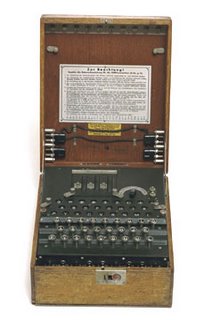
..."During World War II, the Germans used the Enigma, an electromechanical cipher machine, to develop nearly unbreakable codes for sending messages. The Enigma's settings offered 150,000,000,000,000,000,000 possible solutions, yet the Allies were eventually able to crack its code..."

It may seem like cracking a secret code when going back and forth between GIS and CAD, but luckily we have tools that make that job easier as long as we know what we're looking for.

GIS and CAD are both used to digitally store mapping data. In the CAD case often the storage of mapping features may be a secondary concern of the drawing author whose main focus is on creating a set of construction plans or generating an asbuilt survey. The language of CAD is designed to facilitate the creation and manipulation of geometry that can be used as abstract symbols of real world objects. The language of GIS is similar in that it facilitate the creation and manipulation of geometry that can be used as abstract symbols of real world objects. CAD contains many more geometric forms. GIS has the concept of data systems or spatial databases. By grouping objects together based on table of common attributes and geometric types, GIS datasets are stored as collections of features (pipes, a roads, a states, a wells...Etc). GIS symbology is derived from the feature's attributes, or identity to express a map story. CAD objects are primarily stored as symbology and their meaning is derived or assumed based on an agreed upon meaning. A red CAD line by agreement may be used to depict a road for example. Furthermore the red line may be stored on a CAD layer called road. However, there is no requirement that many different types of lines may be red or that objects that might depict other mapping feature might not also be stored on a CAD layer called road.

How data is stored, symbolized, grouped and encoded into geometric primitives in either system can be quite different. We've discussed previously that there are many standard and non-standard ways that are commonly used to encode tabular attributes, or are used to differentiate object one from another in CAD. These techniques are foreign to the GIS environment where every feature inherently has a table of attribute where information can be stored and manipulated using standard database techniques. However, CAD can still contain a wealth of "organized" information that can be made accessible to the GIS if a suitable process for interpreting and translating the data can be used.

Some of the common issues that CAD and GIS professionals face are directly related to the way data is stored in GIS and CAD. Some challenges are based on convention, relics of legacy systems, or the weaknesses or strengths of one or the other system. For whatever reason a CAD map and a GIS map may look very much the same down to the pixel on the screen or the ink mark on paper, but they can be very difficult to use together, or interchangeably in an interoperable workflow.

Here is a partial list of some of the topics we will discuss in the future that are related to successful semantic translation:


  1. More than one object that maps to a single object.
  2. A single complex object may need to be mapped to multiple objects.
  3. Some identifying property of one object may be inferred by inclusion, proximity, orientation or intersection with another object.
  4. Combinations of symbolic properties may denote physical or attribute properties.
  5. Cartographic license/convention may change the geometric shape of features that may need to be modified or repaired.
  6. Geometry may need to be simplified to be made useful in one system or another.
  7. Geometry may need to be enhanced or augmented to make it more useful.
  8. Inferred geometry may need to be added.
  9. Objects may hold links to external sources of information such as tables or databases.

Continue to Part 3...

December 06, 2005

Semantic Translation Part 1


My wife was doing some Christmas shopping for our little Guatemalan daughter, Evie, and picked up this magical animated lamp. Evie is going to love it! Upon further inspection of the packaging I discovered the perfect example to explain the benefits of Semantic Translation in GIS and CAD translation.

Look at the product name. It is classic! SEABED WORLD LAMP LIGHTING MOVE. What does that MEAN? My wife and I tried to decode it using knowledge of the product, the picture and the cryptic English word conversion. Lets pick it apart. SEABED..., an interesting choice of words. WORLD perhaps this gives us a clue to the author's intent... The product is creating an environment a WORLD. In English, I think we would say "underwater-world". LAMP..., well yes it is a lamp. LIGHTING,... Yes, it has a light and could be lighting up the room? MOVE...,well a Chinese person unfamiliar with English grammar could easily misplace the -ING ending on the verb MOVE. The words LAMP and LIGHT or LIGHTING are redundant, maybe in China the word for LAMP is not as specific as it is in English. I think what my wife bought for my daughter is a "Moving Undersea-World Lamp".

It is my opinion that GIS and CAD are likewise different spatial languages. Context, jargon, slang, word order, figures of speech and convention are all relevant to the discussion of GIS an CAD translation. Simply converting one word to another as you can see doesn't guarantee the translation is successful, or that meaning has been transferred. Here is some more text from the lamp packaging submitted for your amusement. In case you can't quite make it out, the package says:

1.) Please don't place it in the following places:
a) Nearby strong vibration.
b) in the dusty place

2.) Please do not touch in the movement.

3.) Please dno't (sp) clean it by using paint or other chemical materials. Neuter soap or cleaner as cleaning liquid is recommenable.

* This is not designed for lighting purposes, and should not be used continuously for periods over 8 hours.

4. Plesse (sp) don't place the product nearby the things that easily catch fire or curtain.

Until next post... beware of "the dusty place!"

Continue to Part 2...

December 05, 2005

Browsing for Hidden Microstation Files


My daughter had her very first basketball game this weekend. She did great, she doesn't really know all the rules yet, but she did well none the less. She even scored a basket! She is a fast learner and good athlete. I'm very proud of her. The technical distinction between traveling, pivoting and dribbling are not intuitive to her or any novice, but an understanding of them are required to perform the task of playing basketball successfully.

One technical rule of viewing Microstation design files in ArcGIS is that by default Microstation design files have a .DGN extension. Because of historical limitations in Microstation files sizes, the number of levels, and file naming constraints in DOS, Microstation users have taken advantage of the ability to name a file with any file extension, not just .DGN. ArcGIS by default only reads Microstation drawings with a .DGN file extension. However you can select the "view all Microstation files extensions" parameter on the CAD tab of the OPTIONS dialog box accessed from the Tool menu of ArcCatalog to alert ArcGIS to search for Microstation files with any extension.

After you do this you may still not see your Microstation files unless there is at least one CAD file in that directory with the standard CAD file extensions; .DWG, .DGN or .DXF. Having at least one standard named CAD file either real or dummy will trigger ArcGIS to scan the contents of that directory for CAD files. This is the way ArcGIS was designed to avoid scanning all files in every directory. My Suggestion is that if you have directories of Microstatoin drawings with file extensions other than .dgn, you don't have to rename them. Instead include a empty Microstation file called BLANK.dgn in the directory with your Microstation files.

December 02, 2005

Table Driven CAD to GIS Conversion

I am a commuter. I drive an hour one way, to and from work (against traffic). It usually takes one hour. If I could control all the cars, trucks and weather between work and home it would always take me about one hour day after day after day.

Obviously I don't have this luxury, however sometimes in the case of CAD to GIS translation you can put yourself into a situation where you can control inputs and outputs through standards to an extent where automating data conversion is possible and desirable.

Automated translation is most practical when both the input and output are finite and known. It is best when both CAD and GIS professionals have worked together to define both a CAD standard and a target GIS schema to ensure the best understanding of each data type. In the case where there is a one-to-one correspondence between CAD entities and GIS features all that is required is a correlation matrix between the two. As discussed in my previous post, it is common to differentiate CAD data by layer and then symbolic properties, sometimes there is a direct correlation between layers and GIS feature classes, other times there may be combinations of layers that can be considered one feature class, and other times certain CAD objects on a CAD layer may go to different GIS feature classes. As long as you can define a consistent and reliable mapping between the combination of CAD Layers and graphic properties, and target GIS feature classes you can automate with a table driven CAD translation .

I've created a sample geoprocessing script that reads an input table that is interpreted as a correlation matrix. Included in the table are correlation records that contain values to build a conversion query and then identifies an output feature class for CAD objects that satisfy that query. The script tool itself is based on the ArcGIS SELECT tool which allows you to perform a query and copy one feature class to another. I am leveraging the fact that ArcGIS reads CAD files as feature classes so that my source CAD feature classes can be used with this simple GIS tool. The script takes as input each record in the specially formatted input correlation matrix table to build a query and then copy or APPEND the data to the correct target feature class.

Using the accompanying CreateCorrrelationMatrix ModelBuilder model tool to generate a skeleton matrix table from a sample CAD file is a useful way to build the necessary table structure with the proper columns as well as populating it with unique combinations of layer and graphic property occurrences in the drawing that may be depicting possible feature class sources. The resulting matrix table will have the proper schema but will require much editing to make it efficient and meaningful as input to the automated table driven translation script. You need to add the paths to the target feature classes. You would need to delete records that describe CAD objects you are not interested in migrating, and you will want to omit redundant or superfluous values. There is no need to query for both red and blue objects on a particular layer when you are interested in all objects on a layer for example.

This type of approach is an efficient and useful way to perform CAD conversion to GIS data when there is a direct correlation between CAD entities and GIS features. You may want to use the logic from this type of routine to build your own models and scripts to automate even more sophisticated routines to tackle the job of "semantic translation" when there is a less straightforward relationship between the objects in the CAD file and the desired GIS feature output... More about that later.

December 01, 2005

Decoding Mystery CAD Drawings

I recently signed up for one of those Online movie deals instead of dish TV and watched X-Men 2 last night. It was ok, what would you expect.. its a comic book. Seems to me the whole "visual media thing" is at a cross roads, HD-TV, Broadcast, satellite, Digital Cable... On Demand, No Late Fees, Pod Casting, TiVo... I'd be confused if it weren't for the fact I watch less than 5 hrs of TV a week and don't care that much. When you think of how you might be able to use these different media choices in combination it can be dizzing.

Attributing CAD files is a similar grab bag of choices. There are some "traditional', "emerging" and more than one "standard" way of attributing the entities in a CAD file. Perhaps the most powerful feature of CAD is its flexibility, but in the area of GIS and CAD interoperability it is also one of its most challenging aspects.

When dealing with the topic of GIS and CAD interoperability my target audience is quite diverse, some of you are CAD people, others GIS, some both, and many neither (you just need to get your job done). For the later groups, many times you are tasked with making sense of a CAD file of dubious origins that looks to have the needed information for you to build some GIS content. This CAD file also contains many objects that although interesting and useful to the drawing's author are not of direct use for your purposes. The task then is making sense of what you've got, to get what you need. In my previous post I discussed the value of database tools applied directly to a CAD file without conversion. Similar techniques can be used to analyze and prepare a CAD file for conversion or translation. Lets consider using the FREQUENCY tool to get a profile of a drawing's content.

There are many different ways to differentiate data within a CAD drawing. Some of these methods include those standard and not so standard attribution methods, but more common is the variation of LEVEL or LAYER and graphic properties such as COLOR, LINESTYLE and line WEIGHT. I find it useful to create a FREQUENCY scan of the symbolic variance in a CAD drawing. The result is a table where I see all the unique combinations of layer and graphic properties. I can see for example that there may be four different colored objects on a single layer. The color variance on this layer may distinguish between different GIS feature classes, such as water lines and sewer lines on a utilities layer, or perhaps different physical properties of similar features, or what might be considered different sub-types in a GIS. With knowledge of the CAD standard I might also be able to detect drafting errors, such as GREEN lines that are supposed to be on the SEWER layer with a ByLayer color designation of GREEN, which are instead on the WATER layer, and have an "entity color" of GREEN. Is this a special water pipe, or a sewer line on the wrong layer?


There is a sample Toolbox on ArcScripts that contains a model builder model that performs this type of scan on a CAD file using the FREQUENCY tool. This toolbox also contains a script that might help you automate a special type of conversion workflow. More about that later...
FREE hit counter and Internet traffic statistics from freestats.com